
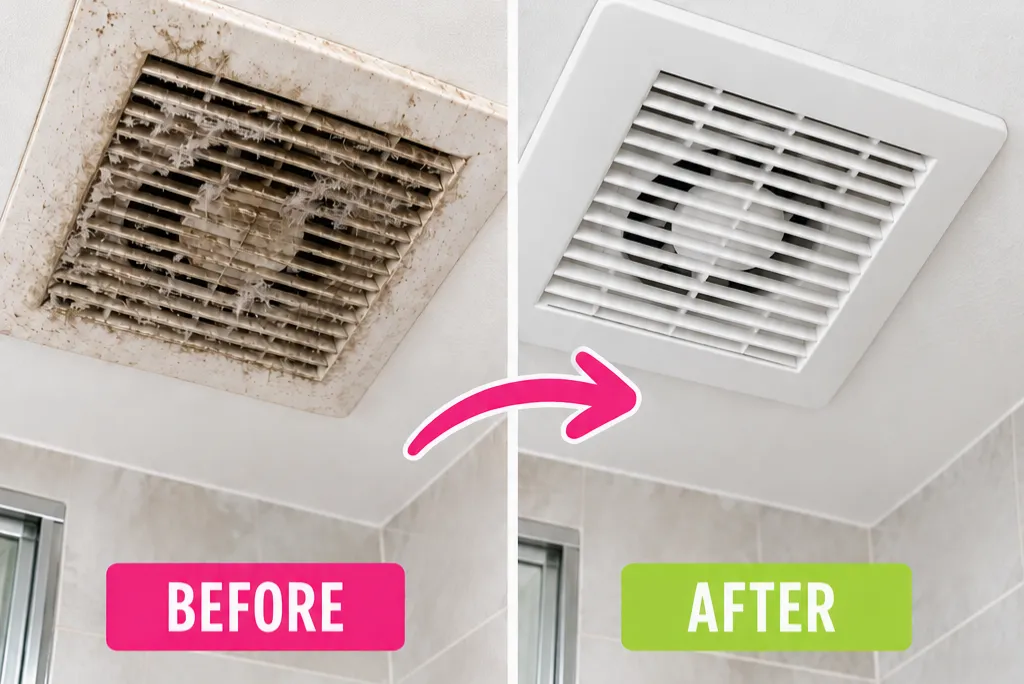
Look up at your bathroom exhaust fan and there’s a good chance you’ll spot a thick layer of grey, fuzzy dust clinging to the cover. It’s one of the most skipped spots in the bathroom, but a dusty fan pulls moisture out less effectively, leaving extra humidity behind that can feed mold on your walls and grout.
This is an electrical fixture, so the process looks a little different from cleaning tile or grout, safety comes first here, every time.
This post contains affiliate links. If you buy through these links, I may earn a commission at no extra cost to you.
Why Bathroom Exhaust Fans Get Dusty So Fast
Every time the fan runs, it pulls air, and everything floating in that air, straight through the housing on its way outside. Dust, lint, and bathroom humidity combine into a sticky film that clings to the blades and cover far faster than dust settles on a shelf or countertop. Because the fan sits overhead and rarely gets a second glance, that buildup has months, sometimes years, to thicken before anyone notices.
Before You Start: Safety Comes First
- Turn off the fan at the wall switch, and if you can access it, flip the breaker too. Never clean a fan that’s still connected to power.
- If your fan has a light, Bluetooth speaker, or any other electrical feature built into the cover, don’t submerge it in water. Wipe it down instead of soaking it.
- Keep water and cleaning spray away from the motor and wiring at all times. Dampen your cloth, don’t spray directly onto the fan.
- Use a sturdy step stool if the fan is out of easy reach, and have someone nearby if you’re working above shoulder height.
- If the cover feels stuck or the mounting clips have been painted over during a past repaint, don’t force it. Score the paint line gently first, yanking on it can crack the plastic.
What You’ll Need
- A vacuum with a brush or crevice attachment
- A soft microfiber cloth
- Dish soap
- Warm water
- A soft-bristle brush or old toothbrush, for tight spots
- A screwdriver, if your cover is held on by screws instead of clips
If your vacuum didn’t come with a good brush attachment, this vacuum brush attachment here makes a huge difference, it pulls dust out of vents and corners a cloth alone can’t reach.
How to clean it:
Step One: Turn off the power at the switch and breaker before touching anything.
Step Two: Vacuum the outside of the cover first, while it’s still attached. This clears loose dust before you start removing parts, so you’re not shaking a dust cloud into the bathroom.
Step Three: Remove the cover. Most are held on by spring clips, gently pull down and feel for the wires or tabs on either side, then release them. Support the cover with one hand as it comes free so it doesn’t drop.
Step Four: If your cover has a light or any wired feature, disconnect the wire at this point before setting the cover aside.
Step Five: Wash the cover in warm water with a few drops of dish soap, using a soft brush on tight grooves. Skip this step entirely if the cover has a light or electronic feature, wipe it with a damp cloth instead.
Step Six: While the cover dries completely, vacuum the fan housing, blades, and motor area using a brush attachment. Get into the corners, where dust tends to build up thickest.
Step Seven: For any caked-on grime the vacuum can’t lift, dampen a microfiber cloth with the same warm, soapy water and wipe gently, avoiding the motor and any exposed wiring. Follow with a dry cloth.
Step Eight: Check the vent opening leading outside for blockages, debris or even a small bird’s nest can build up over time and reduce airflow. Clear what you can reach with the vacuum hose.
Step Nine: Make sure the cover is completely dry before reattaching it. Putting a damp cover back over a running fan in a humid bathroom just gives new grime somewhere to stick right away.
Step Ten: Reattach the cover, reconnect any wiring if applicable, and turn the power back on.
A Trick to Keep Dust From Building Back Up So Fast
Once the cover is clean and dry, rub a crumpled piece of wax paper over the slats before reinstalling it. This leaves a very thin layer of wax on the surface, which does two things: it makes the slats slightly slippery so dust has a harder time clinging to them, and it helps neutralize the static charge that builds up as air moves through the vent, static is actually a big part of why dust sticks so stubbornly in the first place. It’s not permanent, but it noticeably slows how fast the cover gets dusty again.
Signs Your Fan Needs More Than Cleaning
While you’re up there, it’s worth checking for a few things cleaning won’t fix:
- Unusual noise, like rattling or grinding, can mean loose parts or a motor that’s starting to fail
- Weak airflow even after a thorough cleaning may point to a blocked vent duct further down the line, not just a dirty cover
- Visible damage to the housing or cracked blades means it’s time to call a professional rather than keep cleaning around the problem
How Often Should You Clean It
Every 6 months is a solid default for most bathrooms. If your household showers daily, has pets, or you notice visible dust faster than that, cleaning every 3 to 4 months keeps the fan running efficiently instead of working harder than it needs to.
Frequently Asked Questions
Can I wash my bathroom fan cover in water?
Yes, as long as it doesn’t have a light, speaker, or other electrical feature built in. Plain covers can be washed with warm, soapy water. Covers with electronics should only be wiped down, never submerged.
Why is my bathroom fan louder than it used to be?
Dust buildup on the blades can throw off their balance and make the fan work harder, which often shows up as extra noise. If cleaning doesn’t fix it, the motor or bearings may be wearing out.
Does a dirty exhaust fan actually cause mold?
Indirectly, yes. A dust-clogged fan pulls less moisture out of the bathroom, and that extra humidity lingering in the air gives mold more opportunity to grow on grout and walls.
How do I know if my fan cover is held on by clips or screws?
Look at the edges of the cover, if you don’t see visible screws, it’s almost always spring clips. Gently pull down on the cover and feel along the sides for wire tabs before assuming you need a screwdriver.