Your favorite song suddenly sounds flat. The bass is gone. One AirPod is quieter than the other. You start thinking they are dying.
Most of the time, they are just dirty. They sit in your ears for hours. Then they go into a pocket full of lint. Wax and dust build up on the tiny mesh, and the sound gets blocked. Here is how to clean AirPods in ten minutes, with things you already have at home.
The Dry-First Rule
AirPods can handle a little sweat, but they are not waterproof. So follow one simple rule. Start dry. Use a damp cloth only if dry doesn’t work. Never put them under running water.
Also keep bleach, hydrogen peroxide and sharp things like pins away from them. They can damage the plastic or poke a hole in the mesh.
The mesh spots differ on each model. So check your earbuds’ manual or the maker’s website for yours.
How to Clean AirPods and the Tiny Mesh
Not sure which AirPod is the dirty one? Play a song and wear one AirPod at a time. The quieter one needs cleaning first.
What you’ll need:
- A soft, dry, lint-free cloth
- Dry cotton swabs
- A soft, dry brush (a clean, soft toothbrush works)
How to do it:
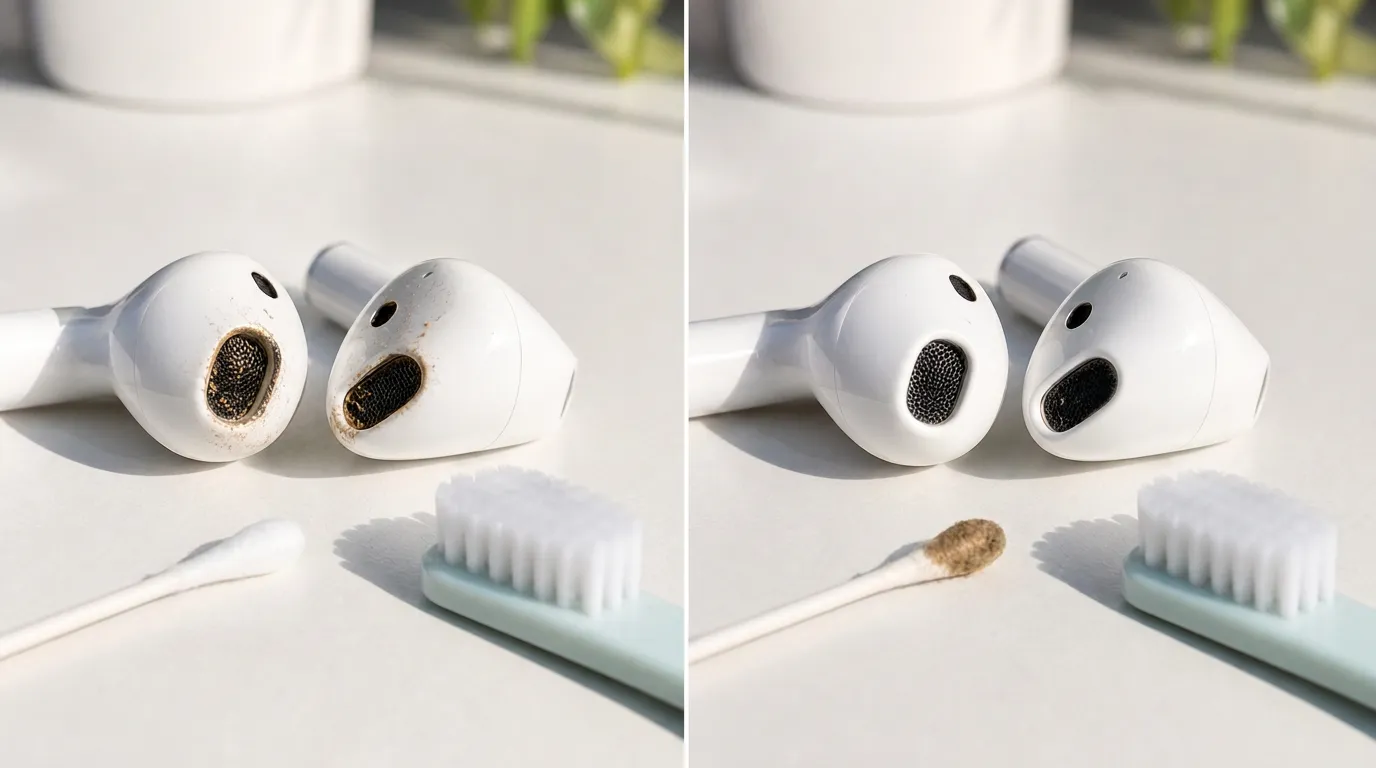
- Wipe the outside. Use the dry cloth on the whole AirPod. This removes the loose dust first.
- Clean the mesh. Rub it gently with a dry cotton swab. Press lightly, because hard pressing pushes the wax deeper.
- Brush out the dust. Sweep the loose bits away with the soft brush.
- Clean the ear tips. Do yours have soft rubber tips? Pull them off and rinse them in plain water. Don’t use soap. Then dry them fully before you put them back.
- Let them dry. Wait until they are completely dry. Only then put them in the case or in your ears.
How to Disinfect AirPods
Did you drop your AirPods on the floor, or wear them for a workout? Then germs and sweat may be sitting on the outside. You can’t see them, so a quick wipe helps.
What you’ll need:
- A 70% isopropyl alcohol wipe
- A soft, dry cloth
How to do it:
- Wipe the outside only. Stay away from the mesh and every opening. Alcohol inside can damage the speaker.
- Dry them well. Wipe with the dry cloth. Wait until they are fully dry before you use them.
How to Clean the AirPods Case
The case collects lint every time it sits in your pocket or bag. Also, dirt in the charging port can stop your AirPods from charging.
What you’ll need:
- A soft cloth
- A soft, dry brush or a dry cotton swab
- 70% isopropyl alcohol (only if the outside is very dirty)
How to do it:
- Wipe the outside. If it is very dirty, dampen the cloth with a little alcohol. Don’t let any liquid reach the charging port.
- Clean the inside. Use the brush or swab to lift out the lint. Never use a toothpick or a knife. It can scratch the metal contacts.
- Let it dry. Keep the lid open and turn the case upside down until it is completely dry.
How Often to Clean AirPods
One habit helps the most. Wipe your AirPods with a dry cloth every time you take them out. Fresh wax and sweat come off in seconds. Old dirt turns hard.
If you use them daily, do a full clean once a week. If you wear them for workouts, wipe them after each one.
Is the sound still low after cleaning? Or do they still not charge? Then the problem is not dirt. Contact the company that made them, or take them to a service center.
Frequently Asked Questions
What’s the best way to clean AirPods?
The best way to clean AirPods is a dry, soft cloth and a dry cotton swab. First, wipe the outside. Next, gently clean the mesh with the swab. Then brush away any dust. Let everything dry completely before you use them again.
Can I wash AirPods with water?
No. Don’t run them under water or soak them. Only soft rubber ear tips can be rinsed, and only with plain water.
How do I remove ear wax from AirPods?
Wipe them with a dry cloth. Then clean the mesh gently with a dry cotton swab and a soft brush.
Can I use hydrogen peroxide or bleach?
No. They are too harsh and can damage the AirPods and the case.